前言

最近在研究一件事——就是把下载好的字体文件放入 /source/fonts/ 文件夹中,如何通过撰写 CSS 样式文件来引入?

相信不少人都像我一样,想让自己的博客页面更有自己的个性,于是选择了生态丰富的 Hexo 框架和相对好看的 Butterfly 主题。但是,在构建过程中,难免会遇到一些麻烦。

准备工作

以我下载好的多字重 MiSans 字体和 Google Fonts 的 Noto Sans[1]/Serif[2] SC/TC/HK/JP/KR、Roboto、Roboto Slab、Roboto Mono 在线字体为例。

下载 MiSans 字体

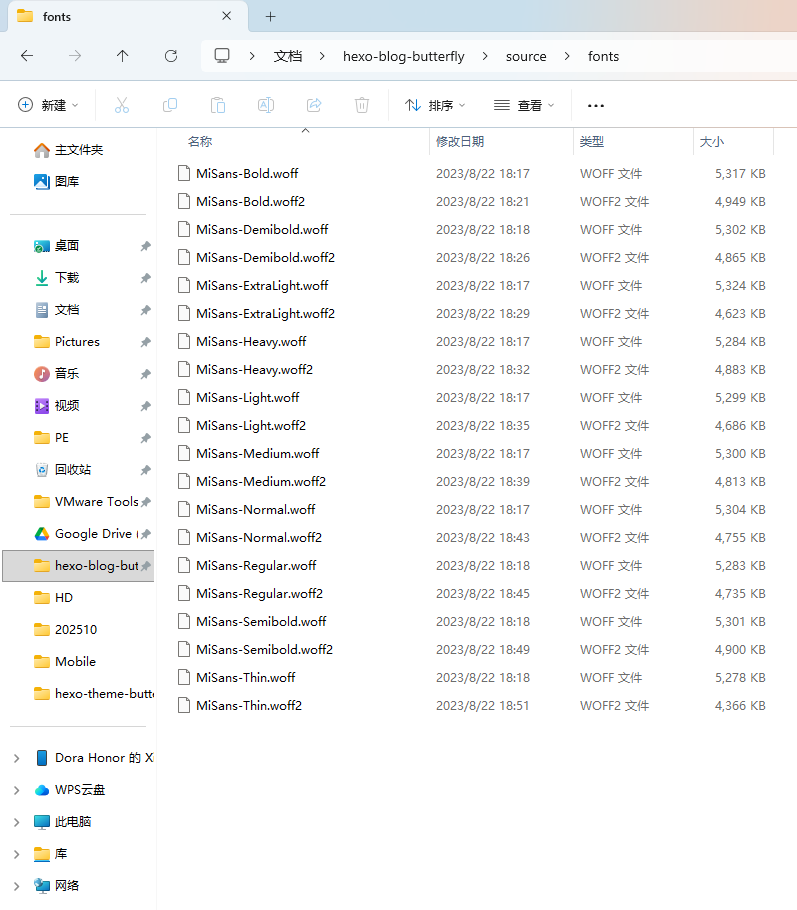
先在 /source/ 里创建 fonts 文件夹,把所需 *.woff*.woff2 格式字体复制进去。

MiSans

导入 Google Fonts

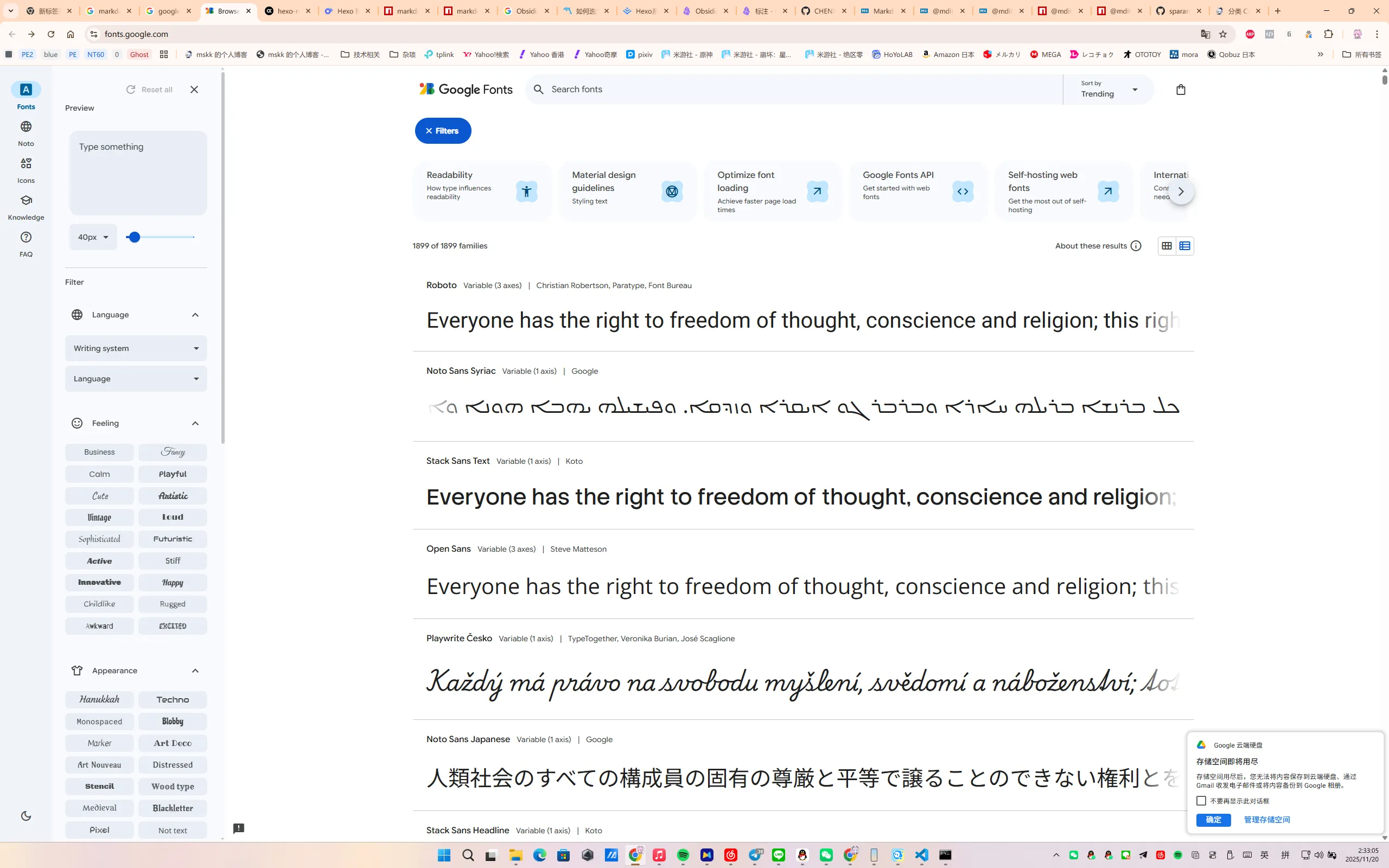
进入 Google Fonts 官网

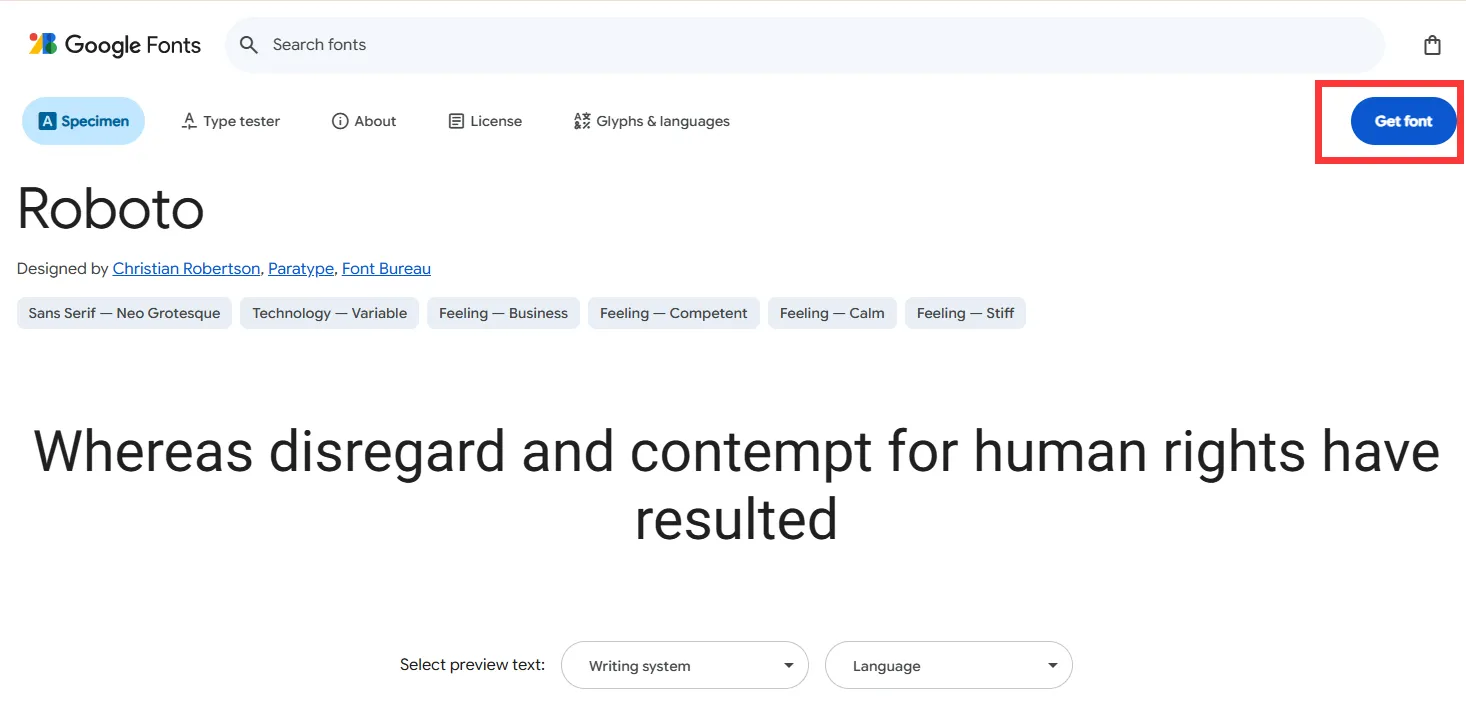
搜索上述字体,对所有字体都选择右上角的【Get font】加入购物车。

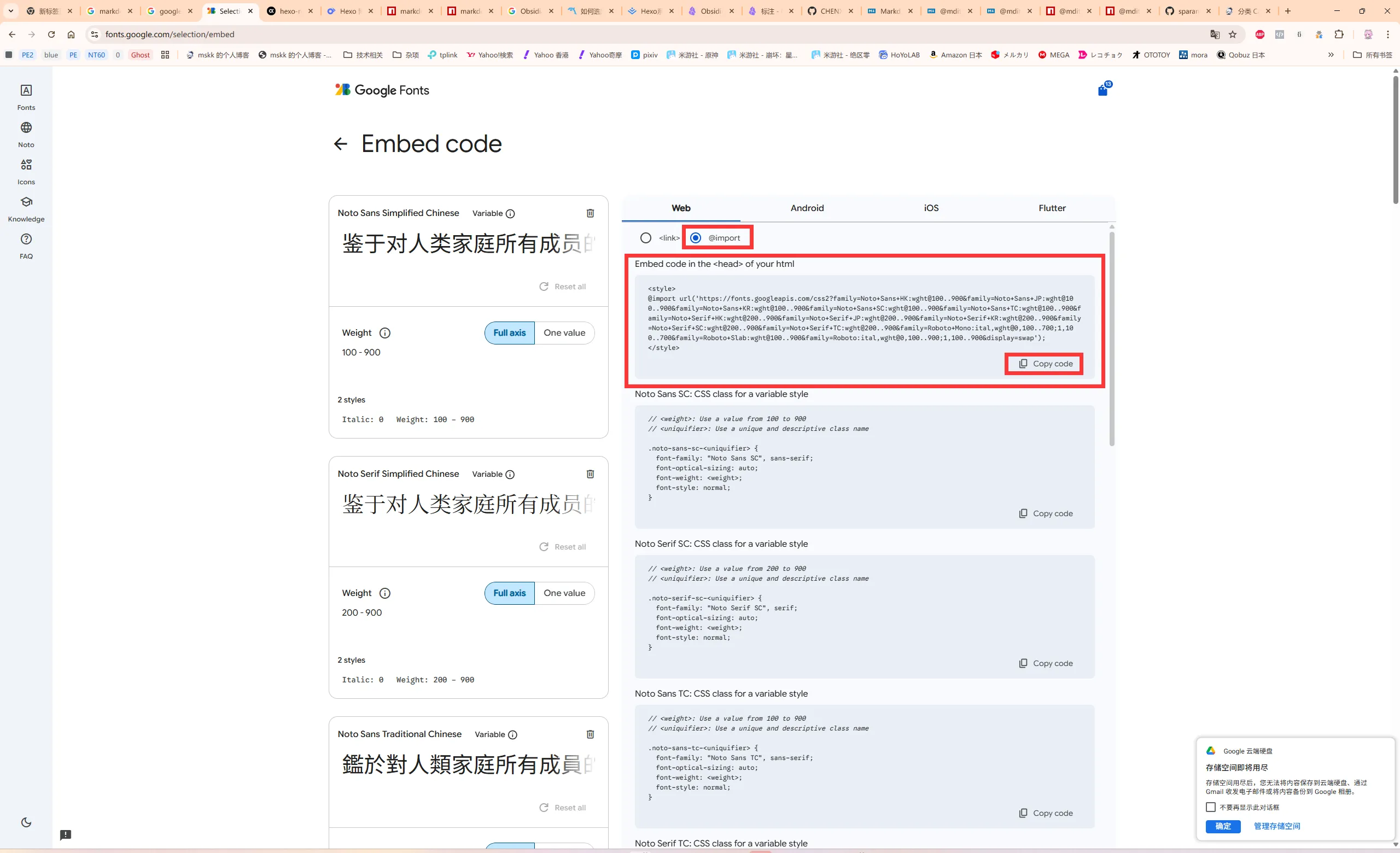
单击页面右上角的购物车按钮,选择右侧的【Get embed code】。
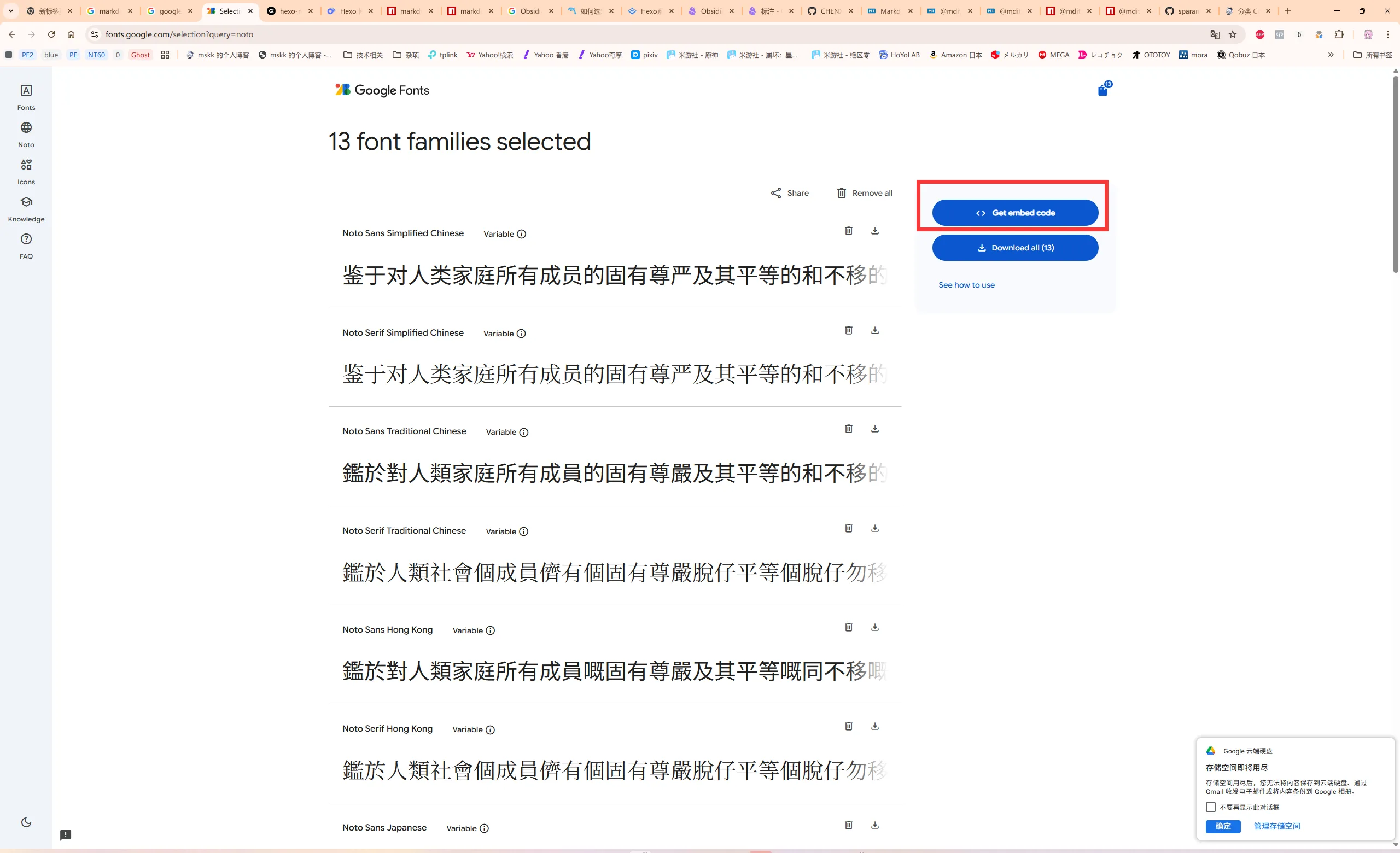
在 Web 栏中选择 @import 单选框,在第一个代码框中将 <style></style> 内的链接复制出来。

@import url("https://fonts.googleapis.com/css2?family=Noto+Sans+HK:wght@100..900&family=Noto+Sans+JP:wght@100..900&family=Noto+Sans+KR:wght@100..900&family=Noto+Sans+SC:wght@100..900&family=Noto+Sans+TC:wght@100..900&family=Noto+Serif+HK:wght@200..900&family=Noto+Serif+JP:wght@200..900&family=Noto+Serif+KR:wght@200..900&family=Noto+Serif+SC:wght@200..900&family=Noto+Serif+TC:wght@200..900&family=Roboto+Mono:ital,wght@0,100..700;1,100..700&family=Roboto+Slab:wght@100..900&family=Roboto:ital,wght@0,100..900;1,100..900&display=swap")

正式开始

创建 CSS 样式文件

用 VS Code 创建一个 CSS 样式文件,保存在 /source/css/ 下。 下面以 fonts.css 文件名为例。

@import url("https://fonts.googleapis.com/css2?family=Noto+Sans+HK:wght@100..900&family=Noto+Sans+JP:wght@100..900&family=Noto+Sans+KR:wght@100..900&family=Noto+Sans+SC:wght@100..900&family=Noto+Sans+TC:wght@100..900&family=Noto+Serif+HK:wght@200..900&family=Noto+Serif+JP:wght@200..900&family=Noto+Serif+KR:wght@200..900&family=Noto+Serif+SC:wght@200..900&family=Noto+Serif+TC:wght@200..900&family=Roboto+Mono:ital,wght@0,100..700;1,100..700&family=Roboto+Slab:wght@100..900&family=Roboto:ital,wght@0,100..900;1,100..900&display=swap");

@font-face {
font-family: "MiSans";
font-display: swap;
font-weight: 100;
font-style: normal;
src: local("MiSans-Thin"),
url("../fonts/MiSans-Thin.woff2") format("woff2"),
url("../fonts/MiSans-Thin.woff") format("woff");
}

@font-face {
font-family: "MiSans";
font-display: swap;
font-weight: 200;
font-style: normal;
src: local("MiSans-ExtraLight"),
url("../fonts/MiSans-ExtraLight.woff2") format("woff2"),
url("../fonts/MiSans-ExtraLight.woff") format("woff");
}

@font-face {
font-family: "MiSans";
font-display: swap;
font-weight: 300;
font-style: normal;
src: local("MiSans-Light"),
url("../fonts/MiSans-Light.woff2") format("woff2"),
url("../fonts/MiSans-Light.woff") format("woff");
}

@font-face {
font-family: "MiSans";
font-display: swap;
font-weight: 400;
font-style: normal;
src: local("MiSans-Normal"), local("MiSans"),
url("../fonts/MiSans-Normal.woff2") format("woff2"),
url("../fonts/MiSans-Normal.woff") format("woff");
}

@font-face {
font-family: "MiSans";
font-display: swap;
font-weight: 500;
font-style: normal;
src: local("MiSans-Medium"),
url("../fonts/MiSans-Medium.woff2") format("woff2"),
url("../fonts/MiSans-Medium.woff") format("woff");
}

@font-face {
font-family: "MiSans";
font-display: swap;
font-weight: 600;
font-style: normal;
src: local("MiSans-SemiBold"),
url("../fonts/MiSans-SemiBold.woff2") format("woff2"),
url("../fonts/MiSans-SemiBold.woff") format("woff");
}

@font-face {
font-family: "MiSans";
font-display: swap;
font-weight: 700;
font-style: normal;
src: local("MiSans-Bold"),
url("../fonts/MiSans-Bold.woff2") format("woff2"),
url("../fonts/MiSans-Bold.woff") format("woff");
}

@font-face {
font-family: "MiSans";
font-display: swap;
font-weight: 800;
font-style: normal;
src: local("MiSans-Heavy"),
url("../fonts/MiSans-Heavy.woff2") format("woff2"),
url("../fonts/MiSans-Heavy.woff") format("woff");
}

@font-face {
font-family: "MiSans";
font-display: swap;
font-weight: 900;
font-style: normal;
src: local("MiSans-Demibold"),
url("../fonts/MiSans-Demibold.woff2") format("woff2"),
url("../fonts/MiSans-Demibold.woff") format("woff");
}

引入 CSS 样式文件

在项目根目录找到 _config.butterfly.yml 文件并打开,找到 inject 注释开头的那行,如下所示。

# Inject
# Insert the code to head (before '</head>' tag) and the bottom (before '</body>' tag)
inject:
head:
# - <link rel="stylesheet" href="/xxx.css">
bottom:
# - <script src="xxxx"></script>

head 处输入 <link rel="stylesheet" href="/css/fonts.css>

# Inject
# Insert the code to head (before '</head>' tag) and the bottom (before '</body>' tag)
inject:
head:
# - <link rel="stylesheet" href="/xxx.css">
- <link rel="stylesheet" href="/css/fonts.css>
bottom:
# - <script src="xxxx"></script>

修改字体样式

在项目根目录找到 _config.butterfly.yml 文件并打开,找到 Global font settings 注释开头的那行,如下所示。

# Global font settings
# Don't modify the following settings unless you know how they work
font:
global_font_size:
code_font_size:
font_family:
code_font_family:

# Font settings for the site title and site subtitle
blog_title_font:
font_link:
font_family:

将参数设为如下值。

# Global font settings
# Don't modify the following settings unless you know how they work
font:
global_font_size: 16px
code_font_size: 12px
font_family: MiSans, Roboto, "Noto Sans SC", "PingFang SC", -apple-system, "Microsoft Yahei", "WenQuanYi Micro Hei", "ST Heiti", "Noto Sans TC", "PingFang TC", "Microsoft Jhenghei", "Noto Sans HK", "Noto Sans JP", Hiragino, Osaka, "Yu Gothic", Meiryo, "MS Mincho", "Noto Sans KR", "Apple Gothic", Seoul, "Malgun Gothic", Dotum, sans-serif, "Roboto Slab", "Noto Serif SC", SimSun, "Noto Serif TC", MingLiu, "Noto Serif HK", "Noto Serif JP", "Yu Mincho", "MS Mincho", "Noto Serif KR", "PC Myungjo", "Shin Myungjo Neue", Batang, serif, "Inter", 'Quicksand', 'Nimbus Roman No9 L', ui-sans-serif, system-ui, sans-serif, "Noto Color Emoji", "Apple Color Emoji", "Segoe UI Emoji", "Segoe UI Symbol"
code_font_family: Consolas, "Roboto Mono", "Monaco", "Andale Mono", "Ubuntu Mono", monospace

# Font settings for the site title and site subtitle
blog_title_font:
font_link:
font_family: MiSans, Roboto, "Noto Sans SC", "PingFang SC", -apple-system, "Microsoft Yahei", "WenQuanYi Micro Hei", "ST Heiti", "Noto Sans TC", "PingFang TC", "Microsoft Jhenghei", "Noto Sans HK", "Noto Sans JP", Hiragino, Osaka, "Yu Gothic", Meiryo, "MS Mincho", "Noto Sans KR", "Apple Gothic", Seoul, "Malgun Gothic", Dotum, sans-serif, "Roboto Slab", "Noto Serif SC", SimSun, "Noto Serif TC", MingLiu, "Noto Serif HK", "Noto Serif JP", "Yu Mincho", "MS Mincho", "Noto Serif KR", "PC Myungjo", "Shin Myungjo Neue", Batang, serif, "Inter", 'Quicksand', 'Nimbus Roman No9 L', ui-sans-serif, system-ui, sans-serif, "Noto Color Emoji", "Apple Color Emoji", "Segoe UI Emoji", "Segoe UI Symbol";
Note

备用字体根据自行需求填写。

Tip

建议多填备用字体,以避免部分字符显示不出的问题。

保存配置文件。

测试样式是否生效

在项目根目录的终端中输入 hexo server 命令并执行,待出现 localhost:4000 时,进浏览器开启链接,查看样式是否生效。

如生效,则可关闭该标签页,在终端中按 Ctrl-C 终止执行。

在服务器部署

此步略。

注意事项

  • 不要在字体样式的 CSS 文件中加入 body 项,否则 _config.butterfly.yml 配置文件的字体样式会失效,且会牵连主题原本自带的 font-awesome v6 图标导致不显示!

题外话

如何一次性引用多个自定义 CSS 样式?

我个人建议将多个 CSS 样式配置只写进一个文件里,这样不容易出现奇怪的问题。

例如将透明样式引入 CSS,只需在行末加入以下内容。

.layout_post>#post {
background: rgba(255,255,255,.75);
}

#aside_content .card-widget, #recent-posts>.recent-post-item, .layout_page>div:first-child:not(.recent-posts), .layout_post>#page, .layout_post>#post, .read-mode .layout_post>#post{
background: rgba(255,255,255,.75);
}

:root {
--card-bg: rgba(255, 255, 255, .75);
}

#footer {
background: rgba(255,255,255, .0);
}
Caution

注意要和原本的样式间隔一行。

参考资料


  1. 中文:思源黑体,日文:源ノ角ゴシック,韩文:본고딕(本고딕),英文别名:Source Han Sans ↩︎

  2. 中文:思源宋体,日文:源ノ明朝,韩文:본명조(本明朝),英文别名:Source Han Serif ↩︎